How Spam Filters Use IP Reputation and DNS Records to Screen Email
Learn how mail servers use real-time blacklists, SPF records, and reverse DNS to filter spam — and what it means for your own inbox reputation.
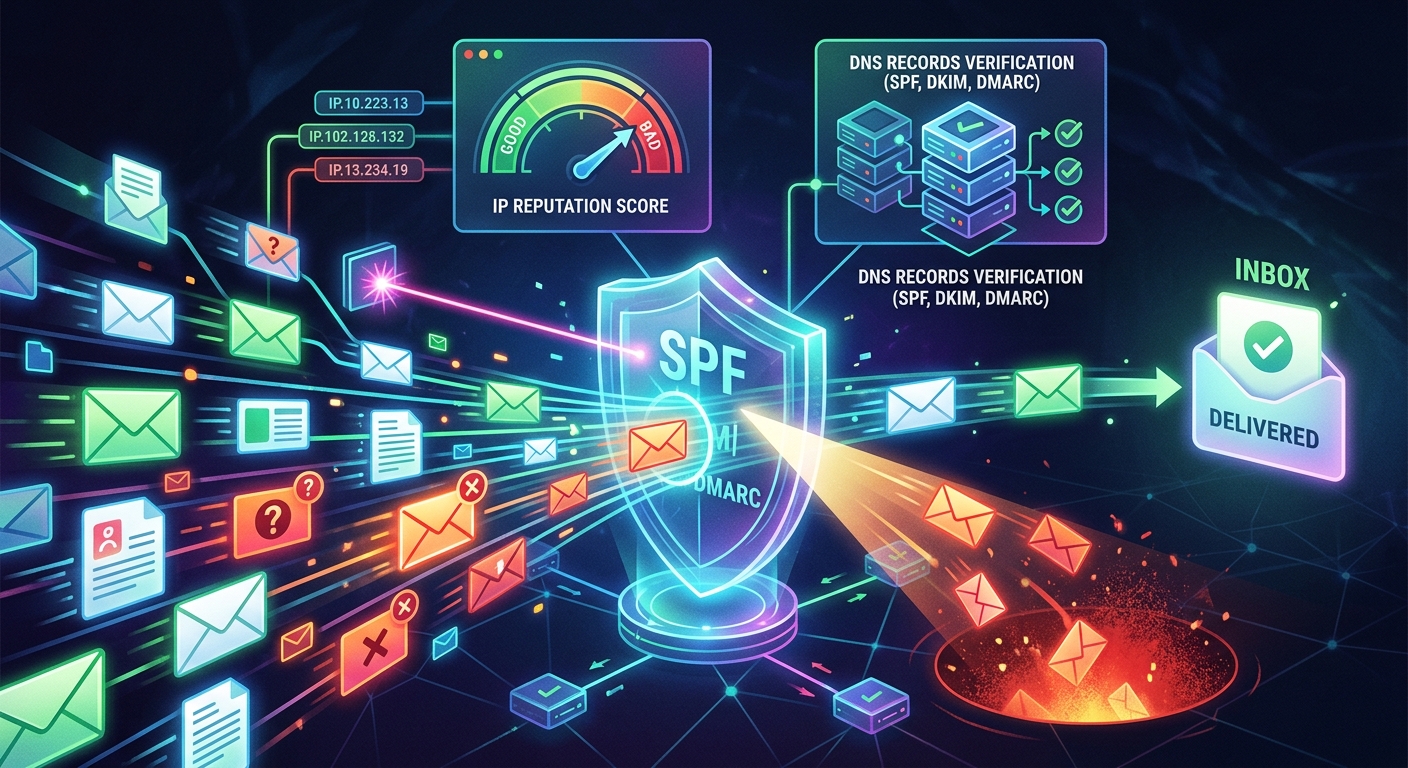
Your email never actually arrives at the inbox first. Long before a human reads a single word, the receiving mail server runs a quiet investigation. It checks the IP address that made the connection, queries several DNS-based databases, and scores the sender's reputation against known patterns of abuse. All of this happens in milliseconds. Most of it is invisible to anyone not watching server logs. Understanding the mechanics behind that process matters whether you manage mail infrastructure or simply want to know why a legitimate message sometimes ends up in the spam folder.
The Signal ChainSpam filtering at the IP layer works as a chain of DNS queries. A receiving server checks whether the sender's IP appears on real-time blacklists, whether the IP is authorized by the domain's SPF record, and whether a valid reverse DNS entry exists. Each check adds or subtracts trust. Passing all three does not guarantee delivery, but failing any one is often enough to route a message to spam or reject it before the body is even transmitted.
What Happens Before Your Message Is Read
The process starts at the SMTP handshake. The moment a sending server opens a TCP connection to port 25 on a receiving server, the receiving server already knows one thing with certainty: the connecting IP address. That IP is not something the sender can fake at the transport layer. It is the first data point the spam filter works with, and it triggers a series of lookups immediately.
The receiving server does not wait for message content. Most filtering decisions happen during the SMTP conversation itself, before any message body is transferred. This is intentional. Rejecting a connection early saves bandwidth and processing time. If the connecting IP carries a poor reputation, the server can issue a 550 rejection code and close the session before accepting a single byte of the email body.
Real-Time Blacklists and the DNS Query Behind Them
Real-time blacklists, often called RBLs or DNSBLs, are one of the oldest and most widely deployed anti-spam mechanisms in production email systems. An RBL is a database of IP addresses flagged for sending spam, operating open relays, or exhibiting other suspicious behavior. The lookup mechanism uses the DNS infrastructure that already underpins the internet, which means no special protocols are required on either end.
To check whether an IP is listed, the receiving server reverses the octets of the address and appends a known RBL domain. For a query against 198.51.100.4, the server looks up 4.100.51.198.rbl.example.com. If that query returns a result, the IP is listed. If it returns NXDOMAIN, the IP is clean on that list. This technique follows DNS blacklist format conventions, standardized so any mail server can query any list using the same mechanism.
Most production mail servers query several RBLs simultaneously. A message may be scored against multiple lists, with each hit adding weight to the overall spam score. Common checks include:
- Whether the IP has a documented history of bulk unsolicited mail
- Whether the IP belongs to a residential or dynamic address range, which legitimate outbound mail servers rarely use
- Whether the IP has been reported as part of a botnet or compromised host
- Whether the IP appears on policy-based lists maintained by large ISPs or major mailbox providers
No single RBL is authoritative. Operators combine multiple lists with local scoring rules to reach a final disposition for each incoming message.
SPF Records and How Sending Authority Is Published in DNS
Sender Policy Framework gives domain owners a way to publish a list of IP addresses authorized to send mail on their behalf. This list lives in a DNS TXT record attached to the sending domain. A receiving server queries that record during the SMTP session and compares the connecting IP against the entries it finds.
If the connecting IP matches an authorized entry, the SPF check passes. If it does not match, the check fails, and the receiving server applies whatever policy the domain owner specified: a soft fail, a hard fail, or a neutral result. A hard fail tells receivers to reject the message outright. A soft fail suggests the message should be treated with suspicion but still accepted for further filtering. This mechanism, formalized in RFC 7208, remains a foundational layer of modern email authentication.
How SPF, DKIM, and DMARC Divide the Work
SPF is one part of a broader email authentication stack. Each standard closes a different gap in the process of verifying who actually sent a message.
Email Authentication Standards Compared
| Standard | What It Checks | Where the Data Lives | What a Failure Signals |
|---|---|---|---|
| SPF | Whether the sending IP is authorized by the domain | DNS TXT record on the sending domain | IP not on the domain's approved sender list |
| DKIM | Whether the message was cryptographically signed by the claimed domain | DNS TXT record holding the public key | Message altered in transit or signing key invalid |
| DMARC | Whether SPF and DKIM results align with the From header domain | DNS TXT record specifying policy and aggregate reporting | Neither SPF nor DKIM passed for the header domain |
Passing all three does not make a message immune to filtering. Content analysis and behavioral signals still apply. But failing any one of them is a meaningful strike against deliverability, and failing multiple is often fatal to a message's chances of reaching the inbox.
Why Reverse DNS Records Can Make or Break Deliverability
A forward DNS lookup translates a hostname into an IP address. A reverse DNS lookup does the opposite: it translates an IP address back into a hostname. Mail servers perform this check on the connecting IP by querying the PTR record for that address.
Legitimate mail servers almost always have a PTR record resolving to a meaningful hostname, and that hostname typically resolves forward back to the same IP. This is called forward-confirmed reverse DNS, or FCrDNS. When it is present and consistent, it adds a credible signal of legitimacy. When it is absent or mismatched, the spam filter notices immediately.
Missing or suspicious PTR records raise the spam score for several concrete reasons:
- Compromised home computers sending spam typically have dynamic IPs assigned by ISPs, which rarely carry properly configured PTR records
- Malicious bulk mailers spinning up cloud instances often skip PTR configuration entirely, leaving only a generic reverse entry
- A mismatch between the PTR hostname and the SMTP EHLO greeting suggests the server was not configured by someone familiar with mail system requirements
Some mail servers reject connections from IPs with no PTR record outright. Others add points to the spam score and continue evaluating. Either way, the absence of a proper reverse DNS entry is a practical liability for any sender trying to reach a major inbox provider.
How Sender Reputation Accumulates Over Years of Behavior
IP reputation is not a snapshot. It builds up over months and years of observed sending behavior. Mailbox providers and anti-spam services track whether messages from a given IP generate spam complaints, bounce against invalid addresses, or hit honeypot addresses. Honeypots are email accounts that exist only to catch senders who harvest addresses rather than collecting them through legitimate opt-in processes.
Spam feedback loops formalize part of this tracking. Major mailbox providers allow senders to register for feedback, meaning they receive a notification whenever a recipient marks a message as spam. This lets legitimate senders remove complainers from their lists. It also means the provider is recording complaint rates against specific sending IPs, and those rates feed directly into reputation scoring over time.
This accumulation is what makes reputation hard to reset quickly. An IP that spent months sending unwanted mail carries that history. Even after the bad actor stops, the damage persists and affects anyone else who later sends from the same address space. Shared hosting and cloud IP pools are particularly susceptible to this problem, since one tenant's behavior can quietly contaminate the reputation of all the others.
Keeping Your Real Inbox Out of Feedback Loops
The practical implication of everything above is that your real email address accumulates associations. Every service you register with ties your address to that sender's infrastructure. If the sender's IP has a poor reputation, if they sell your address to third parties, or if their infrastructure is eventually compromised, your address ends up inside feedback loops it never needed to enter.
Routing signups through a temporary address keeps your real inbox isolated from that risk. Relying on spam protection through a disposable address creates a clean break between your permanent inbox and whatever reputation any given service accumulates. If the service starts sending aggressively or shares your address, the fallout stays contained to the disposable address and stops there.
To reduce your exposure in a structured way, consider these steps in order:
- Use a separate or temporary address whenever registering with a service you have not used before or cannot fully vet.
- Audit services you have already subscribed to and unsubscribe from any you no longer use, reducing the number of senders tied to your real address.
- If you send mail from your own server, confirm that your PTR record is configured correctly and that your SPF record lists only the IPs you actually send from.
- Monitor whether your sending IP or domain appears on any public RBL, particularly after infrastructure changes or migrations to new hosting.
- If you operate a custom domain, review your DMARC aggregate reports regularly. They surface authentication failures that often indicate someone is attempting to spoof your domain without your knowledge.
None of these steps require deep networking expertise. Most are one-time configurations that pay off over years of cleaner, more reliable delivery.
The Verdict That Precedes Every Message You Receive
Every email that lands cleanly in your inbox has already passed a series of automated decisions made entirely at the network layer. The sending IP was checked against real-time blacklists. The domain's SPF record was queried to confirm the server was authorized. A PTR lookup confirmed the IP carried a legitimate hostname. The entire reputation of that IP, built up over months or years of sending behavior, was weighed in milliseconds before the message body ever crossed the wire.
That chain of checks is not foolproof. Sophisticated senders work hard to pass each one, and some do. But for the majority of unwanted mail, reputation signals catch the problem before content filters even see the message. The IP layer is where most filtering decisions actually get made, even if users never think about it.
Knowing this changes how you think about your email address. It is not just a communication handle. It is a reputational asset that accumulates associations each time you hand it out. The spam filtering system is already working at the network level on your behalf. Understanding how it operates gives you the context to protect your own reputation at the user level, starting with something as direct as choosing carefully where you share your real address.
More from the guide library: What Your Public IP Address Actually Tells a Website About You · How Sites Still Identify You After a VPN or IP Address Change